
HR Document Management Software for GCC Businesses
Securely Store, Organize and Track Employee Documents
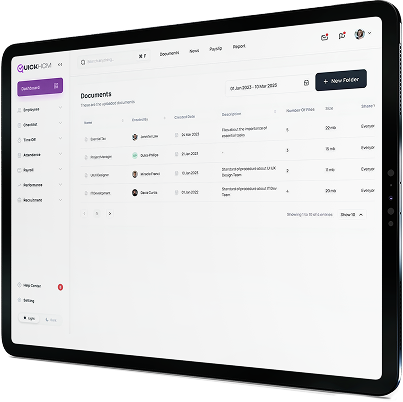
QuickHCM’s Document Management module gives HR teams a structured place to store, organize, access, and track employee documents across the workforce. Manage contracts, identification records, visas, permits, certificates, evaluations, and other HR files while using access controls, expiry reminders, folders, and activity history to support consistent document management.
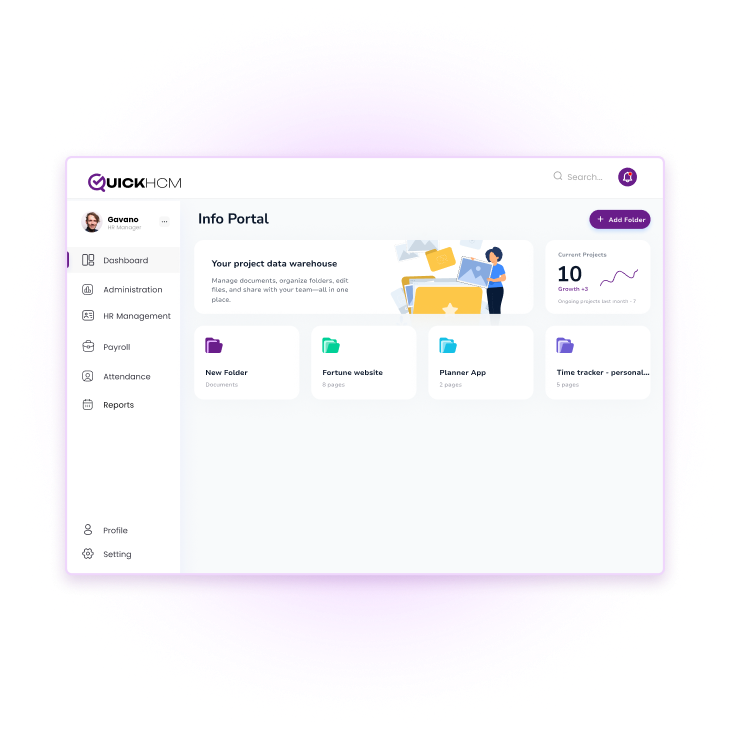
Key Features

Employee Document Repository
Store contracts, identification records, passports, visas, work permits, certificates, evaluations, policies, and other employee-related files within the relevant employee profile. A centralized repository helps HR teams reduce scattered storage and retrieve documents more efficiently.

Automated Expiry Reminders
Record expiry dates for time-sensitive documents such as passports, visas, work permits, licences, and certifications. Configured reminders help HR teams identify upcoming renewals and take action before important documents expire.

Role-Based Access & Permissions
Set access permissions according to user roles and responsibilities. Control who can view, upload, download, update, or remove documents so sensitive employee files are available only to authorized users.

Multi-Format Support
Upload commonly used document formats such as PDFs, images, Word files, and spreadsheets. Depending on the file type and system configuration, authorized users can preview, download, and manage documents from the employee record.

Folder-Based Structuring
Organize documents by employee, document type, department, company, branch, or internal category. Structured folders make it easier for HR teams to locate the correct file without relying on disconnected drives or manual filing systems.

Document Activity and Audit History
Maintain a record of document-related actions such as uploads, updates, access, and removal where supported by the configured workflow. This gives authorized teams clearer visibility into how employee documents have been managed over time.
Benefits for Your HR Operations
- Reduce time spent managing paper-based employee files
- Support structured documentation and compliance-related workflows
- Improve visibility of missing, incomplete, or approaching-expiry documents
- Give authorized teams easier access to employee records across departments
Integrated Across QuickHCM
- Recruitment Management: Carry resumes, identification records, and onboarding documents into the employee profile
- Payroll Management: Keep contracts, salary-related documents, and supporting records connected to the relevant employee
- Employee Information Management: Maintain centralized document visibility within each employee profile
Streamline HR Documentation the Smart Way
See how QuickHCM can help your HR team centralize employee documents, manage access, track expiry dates, and connect records with wider HR workflows across your GCC operations.
HR Document Management Software FAQs
Q1: What types of employee documents can be stored in a document management system?
An HR document management system can store employee contracts, identification records, passports, visas, work permits, certificates, qualification records, evaluations, policies, acknowledgements, and other employment-related files. The exact document categories depend on the organization’s workforce and internal requirements. By linking these files to employee profiles, HR teams can maintain more structured records and retrieve documents without searching across disconnected folders, inboxes, or paper files.
Q2: Can document management systems support businesses operating in the GCC?
Yes. Document management software can support GCC businesses by organizing employee and workforce records across companies, branches, and locations. This is useful for organizations managing contracts, identification records, residency documents, permits, certificates, and other time-sensitive files. QuickHCM provides a GCC-focused HRMS environment in which document categories, permissions, reminders, and workflows can be configured according to the organization’s operating countries, policies, and applicable professional guidance.
Q3: Can the system track document expiration dates?
Yes. QuickHCM can record expiry dates for documents such as passports, visas, work permits, licences, and certifications. Configured reminders can help HR teams identify documents approaching expiry and review the required renewal steps. Reminder timing, recipients, document types, and escalation processes should be set according to the organization’s internal workflow. These alerts support better visibility, but renewal actions and regulatory requirements still need to be managed by the responsible team.
Q4: Can data be extracted from uploaded documents automatically?
Automated data extraction depends on the functionality enabled within the system and the type and quality of the uploaded document. Where supported, selected details such as document numbers, issue dates, and expiry dates may be captured to reduce repeated manual entry. Extracted information should still be reviewed by an authorized user before it becomes part of the employee record, particularly when documents affect payroll, employment, immigration, or compliance-related workflows.
Q5: How is document security managed in HR systems?
QuickHCM uses configurable roles and permissions to control access to employee documents. Organizations can determine which users are allowed to view, upload, download, update, or remove files based on their responsibilities. This helps limit sensitive HR records to authorized users. Access settings should be reviewed regularly and configured according to the organization’s structure, internal controls, data-handling policies, and applicable security requirements.
Q6: Can employees upload documents through mobile devices?
Employees may be able to submit or update selected documents through QuickHCM’s web or mobile self-service workflows, depending on the modules, permissions, and processes configured for the organization. This can make document collection easier for distributed, remote, or field-based teams. HR administrators can then review the submitted information and connect approved documents to the relevant employee record according to the organization’s workflow.
Q7: How does document management integrate with other HR processes?
QuickHCM’s Document Management module connects employee files with structured employee records and related HR workflows. Documents can remain associated with the correct employee as they move through recruitment, onboarding, employment, performance, payroll-related administration, and separation. This connection helps reduce repeated document collection and gives authorized users a more consistent view of the records needed throughout the employee lifecycle.
Q8. How does QuickHCM help manage employee documents?
QuickHCM gives HR teams a centralized system for storing, organizing, accessing, and tracking employee documents. Files can be linked to employee profiles, arranged by folders or categories, managed through role-based permissions, and monitored using configured expiry dates and activity history. As part of QuickHCM’s connected HCM platform, the module supports document workflows across employee records, self-service, recruitment, reporting, and separation processes.
Q9: Can this system support businesses operating in the GCC region?
Yes, modern HR systems are designed to support organizations operating across the GCC. They help manage diverse workforces, standardize HR processes, and ensure consistency across multiple locations. By aligning with regional workforce practices and compliance requirements, such systems enable businesses to operate more efficiently while maintaining structured and reliable HR operations.
Insights & Resources
Stay Ahead with Expert HR Insights

In 2026, HR technology is expected to do far more

Seven things to keep an eye on in the future
If you have managed a team in Bahrain or anywhere

In 2026, HR teams across Bahrain and the wider GCC

The Gulf Cooperation Council business landscape undergoes unprecedented transformation as

Payroll processing represents one of the most critical and complex

Introduction: Employee Data Management as Strategic Priority Organizations across the

Are you still searching through filing cabinets for employee contracts?

In 2025, HR is no longer just about payroll and

In today’s digital-first business landscape, HR teams across Bahrain and