
Employee Air Ticket Management Software for GCC Businesses
Manage Employee Travel Entitlements from Eligibility to Settlement
QuickHCM’s Air Ticket Management module helps HR and finance teams manage employee travel benefits through structured policies and approval workflows. Configure eligibility rules, track entitlement periods, process employee ticket requests, record vendor bookings and costs, manage approved encashment or reimbursement, and maintain travel history within one connected HCM platform.

Key Features

Travel Entitlement Configuration
Define employee air ticket eligibility according to configured criteria such as company, branch, employee category, position, grade, contract type, employment status, origin or destination, family eligibility, travel class, ticket frequency, and applicable policy. Different rules can be maintained for different workforce groups where required.

Entitlement Period and Policy Rules
Configure ticket cycles such as annual, biennial, contract-based, joining-related, relocation-related, or other approved periods. The system can use relevant employment dates and policy conditions to help authorized teams review when an employee may become eligible for the next entitlement.

Encashment & Reimbursement
Manage approved ticket encashment or employee reimbursement where permitted by the organization’s policy. Record the eligible amount, requested amount, approved value, supporting evidence, settlement method, and relevant approval history before transferring approved financial information to the appropriate payroll or payment process.

Employee Ticket Request and Approval Workflow
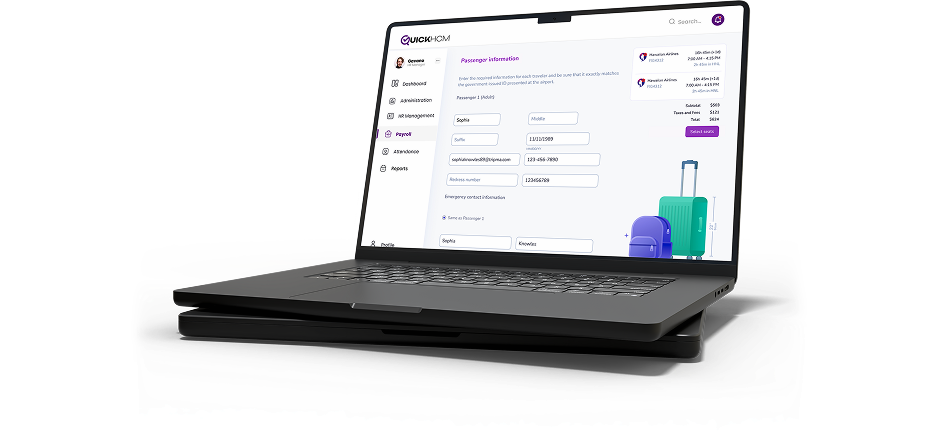
Allow eligible employees to submit ticket, encashment, or reimbursement requests through configured self-service workflows. Requests can include travel details, preferred dates, destination information, dependent details, comments, and supporting documents before being routed to the appropriate manager, HR, finance, or other authorized approvers.

Vendor, Booking and Cost Tracking
Record travel-agency or vendor information, quotations, booking references, travel dates, routes, ticket class, approved amount, actual cost, payment status, and related documents. Authorized teams can use these records to review ticket activity and employee travel costs across the organization.

Travel Entitlement and Usage History
Maintain a structured record of employee eligibility periods, requests, approvals, issued tickets, travel dates, encashments, reimbursements, vendors, costs, dependants, supporting documents, and remaining or future entitlement information. This gives authorized teams a clearer history when reviewing new requests or workforce travel costs.
Business Benefits
- Maintain employee eligibility, requests, approvals, costs, and history in one system
- Apply configured travel-benefit rules more consistently across workforce groups
- Give employees clearer visibility into available entitlements and request status
- Improve coordination between employees, managers, HR, finance, and payroll teams
- Track vendor quotations, booking details, approved amounts, and actual ticket costs
- Keep encashment, reimbursement, and supporting documents connected with employee records
- Review upcoming, used, pending, and historical ticket-entitlement information
Connected Across QuickHCM
- Use employee company, branch, department, position, contract, status, joining date, origin information, and other approved profile data when evaluating configured travel-benefit eligibility.
- Allow employees to review selected entitlement information, submit requests, attach supporting documents, and track approval status where configured.
- Connect approved annual-leave or travel-related dates with ticket requests where the organization’s workflow requires the two processes to be reviewed together.
- Store quotations, itineraries, ticket copies, invoices, approvals, reimbursement evidence, policy acknowledgements, and other travel-related records.
- Transfer approved encashment, reimbursement, deduction, or settlement information into the relevant payroll workflow where configured and authorized.
- Connect approved employee-paid travel costs with reimbursement workflows where the organization processes those amounts as employee expenses.
- Review configured separation-related ticket or repatriation arrangements alongside final employee records where applicable under contract, policy, and professional guidance.
- Review configured ticket information by employee, company, branch, department, entitlement period, request status, vendor, travel route, cost, settlement type, or reporting period.
Bring Employee Travel Entitlements into One Connected Workflow
See how QuickHCM can help your HR and finance teams manage air ticket eligibility, employee requests, approvals, travel vendors, costs, encashment, reimbursement, supporting documents, and entitlement history across your GCC workforce.
Air Ticket Management FAQs
Q1: What is employee air ticket management software?
Employee air ticket management software helps organizations administer travel benefits offered through employment contracts or company policies. It can maintain eligibility rules, entitlement periods, destinations, ticket requests, approvals, vendor bookings, costs, encashment, reimbursement, supporting documents, and usage history. QuickHCM connects these records with employee profiles, self-service, leave, payroll, expenses, documents, separation, and workforce reporting.
Q2: Why is air ticket management important for GCC businesses?
Many GCC businesses manage internationally mobile or expatriate workforces with travel benefits that vary by contract, employee category, destination, family eligibility, or company policy. A structured system helps HR and finance teams maintain clearer records of who may be eligible, what has been requested, what was approved, how the benefit was settled, and when the next entitlement may be reviewed.
Q3: Can QuickHCM manage different ticket entitlement policies?
Yes. Organizations can configure different travel-benefit rules for relevant companies, branches, positions, grades, contracts, employee categories, destinations, family arrangements, travel classes, entitlement periods, and settlement methods. These policies should be defined according to approved employment terms, internal governance, operating-country requirements, and professional guidance rather than assuming the same entitlement applies to every employee.
Q4: Can employees submit ticket requests through self-service?
Yes. Where the appropriate permissions and workflow are enabled, employees can submit ticket, encashment, or reimbursement requests through Employee Self-Service. They may enter travel details, requested dates, destination information, dependent details, comments, and supporting documents. The request can then be routed through configured manager, HR, finance, or other approval stages.
Q5: Can air ticket requests be connected with employee leave?
Yes. QuickHCM can connect ticket requests with relevant leave information where an organization reviews travel and annual-leave arrangements together. This helps authorized users compare requested travel dates with approved leave periods. However, not every ticket benefit is necessarily tied to leave, so the relationship should follow the organization’s contract terms and configured policy.
Q6: How does QuickHCM manage ticket encashment?
Where company policy permits encashment, QuickHCM can record the employee’s request, eligible value, requested amount, approved amount, approval history, and settlement details. Approved values may then be transferred to the relevant payroll or financial workflow where configured. The calculation and payment method should follow the employee’s contract, approved policy, budget authority, and applicable professional guidance.
Q7: Can employee-paid tickets be reimbursed?
Yes. Where reimbursement is allowed, QuickHCM can record the employee’s request, invoice or ticket evidence, travel details, approved amount, comments, and approval status. The approved transaction may be connected with payroll, employee-expense, or another financial settlement workflow depending on the organization’s configuration. Reimbursement remains subject to policy limits and document requirements.
Q8: Can travel vendors and ticket costs be tracked?
Yes. Authorized users can record vendor or travel-agency details, quotations, booking references, routes, travel dates, ticket class, approved amount, actual cost, payment status, and supporting documents. These records can help HR and finance teams review travel spending and compare activity across employees, companies, branches, vendors, routes, or reporting periods.
Q9: Does QuickHCM guarantee compliance with GCC air ticket laws?
No HR platform can independently guarantee legal compliance. QuickHCM supports configurable travel-benefit workflows, records, approvals, documents, and reporting. Each organization remains responsible for confirming whether a benefit applies under the employee’s contract, company policy, operating-country requirements, and current professional advice. Policies should be reviewed whenever employment terms or regional requirements change.
Q10: What air ticket reports can HR and finance teams review?
Authorized users can review configured information such as eligible employees, upcoming entitlement periods, submitted requests, pending approvals, issued tickets, encashments, reimbursements, vendors, ticket costs, destinations, travel dates, dependent benefits, and historical usage. Available reports depend on the fields, policies, workflows, and dashboard options enabled in the organization’s QuickHCM setup.
Insights & Resources
Stay Ahead with Expert HR Insights

Employees do not lower their digital expectations when they arrive

In today’s digital-first business landscape, HR teams across Bahrain and

Workforce planning becomes difficult long before a company realizes it

Employee records tend to multiply quietly. A new hire joins

Growing a business often exposes weaknesses that smaller teams could
Saudi businesses are under constant pressure to make HR operations