
Employee Chat and Internal Messaging Software for GCC Businesses
Real-Time Communication for a More Connected Workforce
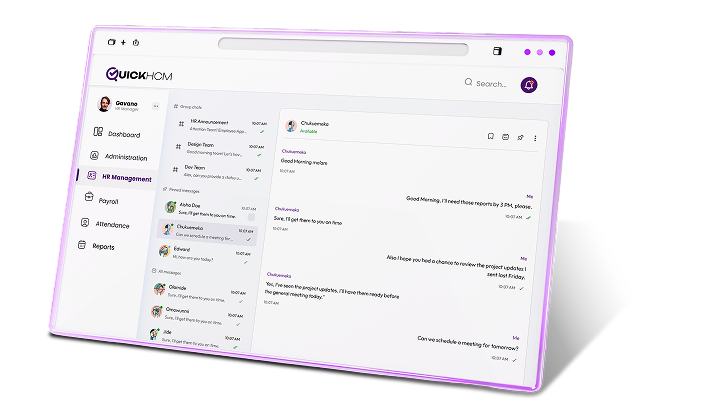
QuickHCM’s Chat Messenger module helps employees, managers, and HR teams communicate within the same HCM platform they use for workforce processes. Support one-to-one conversations, group discussions, department-based channels, file and media sharing, message search, online status, and role-based access across companies, branches, locations, and distributed teams.

Key Features

1:1 & Group Messaging
Allow authorized employees, managers, and HR users to communicate directly within the QuickHCM environment. One-to-one messaging can support routine workplace questions, coordination, follow-up, and employee assistance without requiring every conversation to move through separate email or consumer messaging accounts.

File & Media Sharing
Share approved files, images, and other supported media within relevant conversations where enabled. This can help employees exchange reference materials, screenshots, forms, workplace documents, and operational information without separating the message from its supporting context.

Message Search and Communication History
Search available message history to locate previous conversations, shared information, or relevant files according to the user’s permissions and the organization’s retention settings. This can reduce repeated questions and make selected workplace discussions easier to reference.

Department-Wise Channels
Organize communication around configured departments, companies, branches, locations, functions, or employee groups. Structured channels can help users find relevant workplace conversations and reduce the need to distribute every message to the entire organization.

Online Presence & Status
View available presence or status information and supported message indicators to help users understand whether colleagues are currently available or whether a message has reached the intended conversation. These indicators should be treated as communication aids rather than proof that a person has read, understood, or acted on a message.

Secure & Role-Based Access
Use configured employee accounts, organizational roles, and access permissions to control who can use the messaging module and participate in relevant conversations. Access should reflect the employee’s role, company, department, and approved communication responsibilities.
Business Benefits
- Keep selected workplace conversations within the same environment as employee and HR processes
- Support direct communication between employees, managers, HR teams, and relevant workforce groups
- Organize team and department discussions more clearly
- Reduce reliance on personal messaging accounts for selected workplace communication
- Keep shared files and discussion context connected within supported conversations
- Allow users to search available message history according to permissions and retention settings
- Support communication across companies, branches, locations, and distributed teams
Connected Across QuickHCM
- Use approved employee profiles, organizational assignments, departments, roles, companies, and branches to help identify users and structure relevant communication groups.
- Provide employees with access to selected communication tools through their employee-facing QuickHCM environment where enabled.
- Use announcements for formal workforce updates and surveys for structured feedback, while using chat for shorter conversations and operational coordination.
- Store official documents, controlled files, and employee records in the document-management workflow rather than treating chat attachments as the master record.
- Use chat for appropriate training coordination and discussion while maintaining official course, attendance, completion, and certificate records in the learning module.
- Use messaging for routine coordination while keeping formal goals, ratings, review feedback, and appraisal outcomes within the dedicated performance workflow.
- Use the reporting environment for approved HR and workforce metrics rather than implying that private employee conversations are automatically part of management dashboards.
Bring Workplace Conversations into Your Connected HCM Platform
See how QuickHCM can help employees, managers, and HR teams communicate through direct messages, group conversations, workforce channels, file sharing, presence indicators, and searchable message history across your GCC operations.
FAQ's
Q1: What is an employee chat messenger in an HR system?
An employee chat messenger is an internal communication tool built into an HR or HCM platform. It allows authorized employees, managers, and HR users to exchange direct messages, participate in group conversations, share supported files, and review available communication history. QuickHCM connects messaging with employee identities and other HR modules within the same workforce-management environment.
Q2: Can employees send direct messages through QuickHCM?
Yes. Authorized users can use the Chat Messenger module for one-to-one workplace communication where the feature is enabled. Direct messaging may support routine employee questions, manager follow-up, HR assistance, and operational coordination. Organizations should clearly define acceptable use, administrator visibility, message retention, and the types of sensitive information that should not be shared through chat.
Q3: Can managers create group chats or department channels?
Yes. QuickHCM can support group conversations and department-based communication channels for relevant employees, teams, projects, locations, or business functions. Available group options depend on the organization’s configuration and employee structure. Administrators should control who can create groups, add members, manage conversations, and access previous messages.
Q4: Can employees share files through Chat Messenger?
QuickHCM can support file and media sharing within enabled conversations. Employees may use this to share approved forms, screenshots, reference materials, images, or operational documents. Chat attachments should not replace the organization’s formal document-management system, approval process, version control, or required employee record storage.
Q5: Can Chat Messenger support remote and distributed teams?
Yes. Internal messaging can help employees communicate across offices, branches, project sites, departments, and remote or field-based roles. Users can exchange messages and updates without being in the same physical location. Actual availability depends on internet access, device compatibility, account permissions, and the organization’s QuickHCM setup.
Q6: Are QuickHCM chat messages private?
Message visibility depends on system permissions, administrator controls, retention settings, and organizational policy. Employees should not assume workplace chat has the same privacy expectations as a personal messaging account. Employers should explain whether administrators can access conversations, how long messages are retained, and how chat data may be reviewed or used.
Q7: Can users search previous messages?
QuickHCM supports message search and communication history where enabled. Users may be able to locate available conversations, shared information, or attachments according to their permissions and the organization’s retention settings. Search should not be described as a complete or permanent archive unless deletion, retention, administrative access, export, and historical coverage have been technically confirmed.
Q8: Does QuickHCM Chat Messenger replace email and external messaging tools?
Employees may communicate using the languages supported by their devices, keyboards, and enabled QuickHCM environment. This can be useful for diverse GCC workforces. However, multilingual communication should not be presented as automatic translation unless that feature has been confirmed. Users remain responsible for ensuring that their messages are accurate and understandable.
Q9: Can Chat Messenger support multilingual employees?
Yes, the system is designed to support organizations operating across the GCC by helping manage workforce operations in a structured and consistent way. It enables businesses to handle employee processes across locations while aligning with regional practices and operational requirements.
Q10: Is QuickHCM Chat Messenger suitable for GCC businesses?
Yes. QuickHCM can support internal messaging for businesses operating across Bahrain, Saudi Arabia, the UAE, Kuwait, Qatar, Oman, and the wider GCC. Organizations can use it across companies, branches, departments, locations, and employee groups. Access, retention, privacy, monitoring, and acceptable-use policies should be configured according to organizational requirements and applicable employee-data obligations.
Insights & Resources
Stay Ahead with Expert HR Insights

Employees do not lower their digital expectations when they arrive
Saudi businesses are under constant pressure to make HR operations

Workforce planning becomes difficult long before a company realizes it

Employee records tend to multiply quietly. A new hire joins

Growing a business often exposes weaknesses that smaller teams could
An HR manager at a logistics company in Manama was