
Recruitment Management System for GCC Businesses
Manage Recruitment from Job Requisition to New-Hire Handover
QuickHCM’s Recruitment Management System helps HR teams and hiring managers coordinate job requisitions, vacancy approvals, candidate applications, screening, interviews, evaluations, offers, and pre-boarding through one connected workflow. The built-in applicant tracking system keeps candidate information, hiring stages, feedback, documents, and status updates organized across companies, branches, departments, and vacancies.
Key Features

Job Requisition & Approval Workflow
Create job requisitions with details such as position, department, branch, employment type, required headcount, budget reference, hiring reason, skills, qualifications, and target date. Route requests through configured managers, HR teams, finance users, or other authorized approvers before the vacancy is opened.

Applicant Tracking System (ATS)
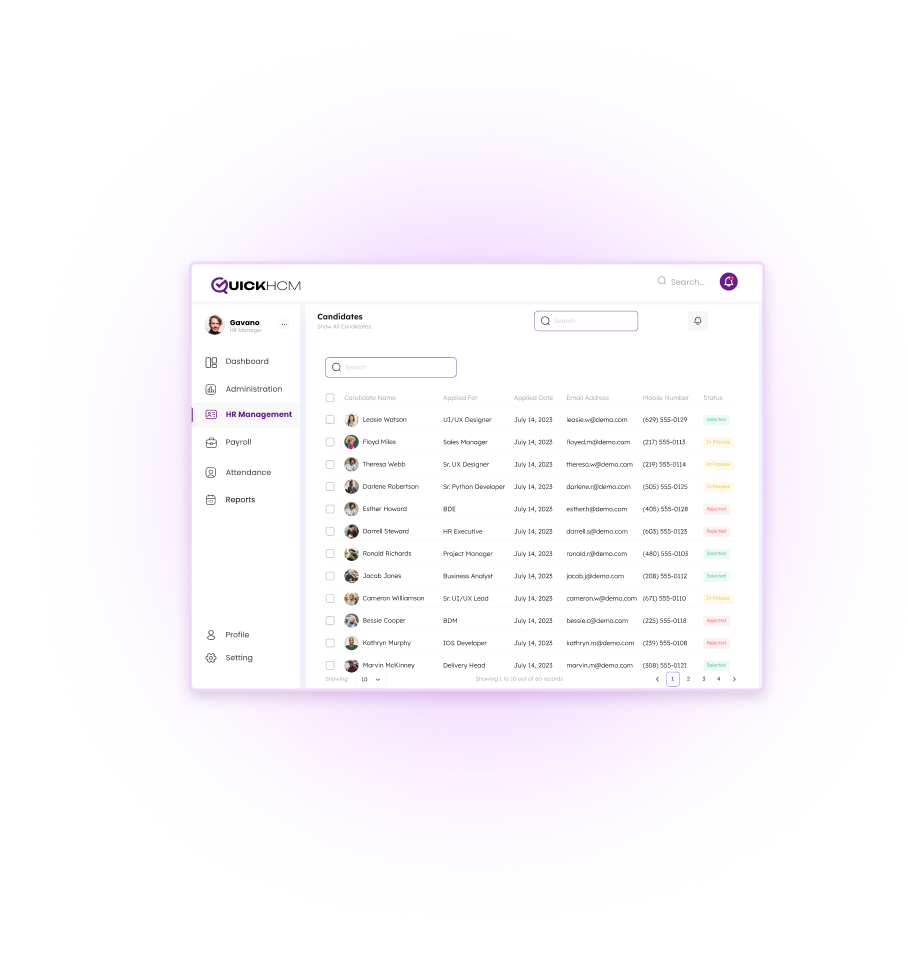
Track applicants through configured stages such as application received, initial screening, shortlisted, assessment, interview, reference review, offer, hired, rejected, withdrawn, or talent pool. Authorized users can review candidate status, comments, documents, activities, and next actions from one recruitment record.

Candidate Profile Management
Maintain candidate profiles containing resumes, contact details, qualifications, skills, work history, application records, interview feedback, evaluation notes, communication history, supporting documents, and previous applications. Centralized profiles help hiring teams review more consistent information throughout the selection process.

Multi-Channel Job Posting
Publish vacancies through the organization’s careers page and manage configured connections with supported job boards, recruitment channels, or social platforms. Available publishing options depend on the organization’s setup, enabled integrations, and the requirements of each external channel.

Configurable Hiring Stages
Build recruitment pipelines around the organization’s hiring process. Stages may include screening, assessments, technical interviews, HR interviews, management review, reference checks, offer approval, offer acceptance, pre-boarding, and hiring. Different workflows can be configured for roles, departments, companies, or employee groups.

Offer Letter & Pre-Boarding
Prepare offer information, route configured approvals, generate offer documents, and begin pre-joining activities for selected candidates. Collect required employee information and supporting documents, assign pre-boarding tasks, and prepare the candidate record for transfer into the employee lifecycle.
Business Benefits
- Organize vacancies, applications, interviews, evaluations, and offers in one system
- Give HR teams and hiring managers clearer visibility into candidate progress
- Support more consistent requisition, screening, interview, and approval workflows
- Maintain centralized candidate profiles, documents, notes, and application history
- Improve coordination across HR, department heads, management, and other reviewers
- Connect successful candidates with pre-boarding and employee-record workflows
Connected from Workforce Planning to Employee Onboarding
Recruitment becomes more useful when approved vacancies, candidate data, hiring documents, employee records, training requirements, and reporting remain connected. QuickHCM supports the handover from workforce demand and job requisition through candidate selection and new-hire setup.
- Connect recruitment requests with approved headcount plans, vacancies, departments, positions, and workforce budgets where configured.
- Transfer approved candidate information into the employee profile when the selected candidate joins the organization, subject to the configured hiring workflow.
- Keep resumes, identification records, certificates, interview documents, offers, approvals, and pre-joining files connected with the candidate or new employee.
- Support configured onboarding and employee self-service activities after the candidate has joined and an employee profile has been created.
- Assign required induction, orientation, compliance, role-based, or development training after the candidate moves into the employee lifecycle.
- Use approved employee and compensation information in payroll setup after hiring, according to the organization’s configured onboarding and payroll process.
- Review configured information on vacancies, applicants, candidate stages, hiring status, source channels, offers, and recruitment activity.
Build a More Connected Recruitment Process
See how QuickHCM can help your HR team manage job requisitions, candidate applications, hiring stages, interviews, evaluations, offers, documents, and pre-boarding across your GCC operations.

Recruitment Management System FAQs
Q1. What is a recruitment management system?
A recruitment management system is software used to organize hiring from job requisition through candidate selection and pre-boarding. It can manage vacancy approvals, job details, applications, candidate profiles, hiring stages, interviews, reviewer feedback, offers, documents, and hiring status. QuickHCM connects recruitment with workforce planning, employee records, document management, training, payroll setup, and reporting so successful candidates can move into the employee lifecycle through a more connected process.
Q2. What is the difference between a recruitment management system and an applicant tracking system?
An applicant tracking system primarily focuses on collecting applications and moving candidates through recruitment stages. A recruitment management system usually covers a broader process, including job requisitions, approvals, vacancy publishing, applicant tracking, candidate profiles, interviews, evaluations, offer management, pre-boarding, and reporting. QuickHCM includes applicant tracking within a wider recruitment workflow connected with other HCM modules.
Q3. Can QuickHCM support recruitment across GCC businesses?
Yes. QuickHCM can support recruitment across Bahrain, Saudi Arabia, the UAE, and the wider GCC by organizing hiring across companies, branches, departments, positions, and employee groups. Organizations can configure requisition approvals, candidate stages, offer processes, documents, and reporting around their operating structure. Country-specific hiring, localization, documentation, and onboarding requirements should be configured according to applicable requirements and professional guidance.
Q4. How does QuickHCM manage job requisitions?
QuickHCM allows authorized users to create requisitions containing details such as position, department, branch, employment type, required headcount, hiring reason, skills, qualifications, target date, and budget reference. The requisition can then move through configured approval stages involving managers, HR, finance, or other responsible users before the vacancy is opened for applications.
Q5. How does the applicant tracking system manage candidates?
The QuickHCM applicant tracking system keeps each candidate connected with the relevant vacancy and recruitment stage. Authorized users can review contact details, resumes, documents, qualifications, work history, application status, interview feedback, internal notes, communication history, and previous applications. Candidates can be moved through configured stages such as screening, assessment, interview, offer, hired, rejected, withdrawn, or talent pool.
Q6. Can HR teams and hiring managers collaborate in the system?
Yes. QuickHCM can give authorized HR users, hiring managers, department heads, interviewers, and other reviewers access to the information and actions relevant to their responsibilities. They can review candidate profiles, record feedback, update stages, assess interview outcomes, add notes, and participate in configured approvals. Access should be controlled through the organization’s roles and permissions.
Q7. Can QuickHCM publish vacancies on job boards and social channels?
QuickHCM can support vacancy publishing through the organization’s configured careers page and supported recruitment channels. Connections with external job boards, recruitment websites, or social platforms depend on the available integrations, organization setup, and the technical requirements of each external service. Confirm the required channels during implementation before presenting them as enabled.
Q8. How does recruitment connect with onboarding and employee records?
After a candidate is selected, QuickHCM can use approved candidate information to support offer preparation, document collection, pre-boarding tasks, and employee-profile creation. The recruitment record can connect with Employee Information Management and Document Management so authorized teams do not need to recreate all candidate information manually. Available handover steps depend on the organization’s configured workflow and permissions.
Q9. What recruitment reports can be reviewed in QuickHCM?
Authorized teams can review configured recruitment information such as open vacancies, requisition status, applicant volumes, candidate stages, application sources, interview progress, offers, hiring outcomes, and recruitment activity by company, branch, department, position, or period. Available reports depend on the fields, workflows, and dashboard options enabled in the organization’s QuickHCM setup.
Q10. Does recruitment software guarantee faster or better hiring?
No recruitment system can guarantee faster hiring, lower costs, stronger employer branding, or better hiring decisions on its own. QuickHCM supports these goals by organizing recruitment information, reducing disconnected administrative work, improving workflow visibility, and helping authorized stakeholders collaborate through a consistent process. Final outcomes still depend on workforce planning, role requirements, sourcing strategy, candidate availability, evaluation quality, and management decisions.
Insights & Resources
Stay Ahead with Expert HR Insights

Employees do not lower their digital expectations when they arrive

In today’s digital-first business landscape, HR teams across Bahrain and

Workforce planning becomes difficult long before a company realizes it

Employee records tend to multiply quietly. A new hire joins

Growing a business often exposes weaknesses that smaller teams could
Saudi businesses are under constant pressure to make HR operations