
Time and Attendance Software for GCC Businesses
Track Working Hours, Manage Shifts and Connect Attendance with Payroll
QuickHCM’s Time and Attendance module helps businesses record employee working hours, manage shifts and rosters, review overtime and attendance exceptions, synchronize approved leave, and prepare structured attendance inputs for payroll across Bahrain, Saudi Arabia, and the wider GCC.
Key Features

Flexible Attendance Capture
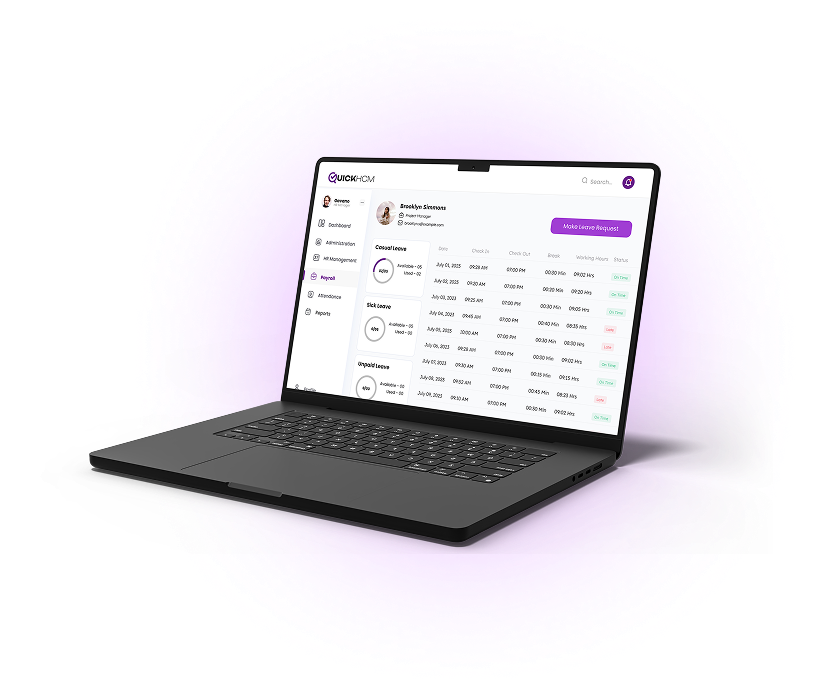
Record employee attendance through supported biometric devices, digital clock-in methods, and mobile attendance workflows according to the organization’s configured setup and workforce requirements.

Overtime & Exception Tracking
Review overtime records, late arrivals, early departures, missed punches, absences, and other attendance exceptions through structured review and approval workflows.

Give HR teams and managers visibility into working hours, overtime, absences, exceptions, attendance patterns, and workforce availability across teams, departments, and locations.

Shift and Roster Management
Create and assign fixed, rotating, split, or department-based shifts. HR and operations teams can manage rosters, working days, rest days, and employee schedules across branches and workforce groups.

Approved leave can be reflected in employee attendance records, helping HR teams distinguish authorized absence from unapproved attendance exceptions.

Attendance, approved overtime, unpaid absence, and exception data can support payroll-related workflows according to configured company policies, employment rules, and approval processes.
Business Benefits
- Reduce reliance on manual timesheets and separate attendance files
- Maintain clearer records of employee working hours
- Review late arrivals, absences, missed punches, and overtime
- Improve visibility into shifts and workforce availability
- Support structured attendance correction and approval workflows
- Connect approved leave with attendance records
- Reduce repeated entry of attendance data into payroll workflows
- Review attendance patterns across departments and locations
Connected Across QuickHCM
- Approved attendance, overtime, unpaid absence, and exception records can support payroll processing according to configured salary and attendance rules.
- Approved leave can synchronize with attendance records, helping teams distinguish authorized absence from attendance exceptions.
- Employees can review relevant attendance logs and submit routine attendance-related requests through the employee self-service portal.
- Attendance records can remain connected with employee profiles, departments, reporting lines, locations, and employment information.
- Attendance and workforce-availability information can support wider headcount, staffing, scheduling, and workforce-planning reviews.
- HR and management teams can review attendance, absence, overtime, exception, and workforce-availability information through connected dashboards and reports.
Modernize Your Attendance System
Give HR, operations, and payroll teams a connected way to manage working hours, shifts, overtime, attendance exceptions, leave records, and payroll-related attendance inputs.

Time and Attendance Software FAQs
Q1: What is a time and attendance management system?
Time and attendance software helps organizations record employee working hours, attendance, absences, overtime, shifts, and attendance exceptions. It gives HR teams and managers structured information about when employees work and helps connect approved attendance records with leave, payroll, reporting, and workforce-planning workflows.
Q2: What attendance methods can QuickHCM support?
QuickHCM can support attendance capture through configured biometric devices, digital clock-in methods, and supported mobile attendance workflows. The exact attendance method depends on the organization’s implementation, device setup, employee groups, locations, and internal attendance policies.
Q3: Can QuickHCM manage employee shifts and rosters?
Yes. QuickHCM can support fixed, rotating, split, weekly, and department-based shift arrangements. HR and operations teams can assign work schedules, rest days, and calendars to employees or workforce groups and review attendance according to the employee’s assigned shift.
Q4: How does QuickHCM track overtime and attendance exceptions?
QuickHCM can record and display overtime, late arrivals, early departures, absences, missed punches, and other attendance exceptions. Organizations can review these records through configured approval and correction workflows before using relevant attendance information in payroll or workforce reports.
Q5: How does time and attendance connect with leave management?
Approved leave can be reflected in attendance records so authorized leave is distinguished from attendance exceptions. This gives HR teams and managers clearer information about employee availability and reduces the need to reconcile separate leave and attendance records manually.
Q6: How does attendance data connect with payroll?
Approved working hours, overtime, unpaid absence, and attendance exceptions can support payroll-related workflows. The exact calculations and processing depend on the company’s configured payroll rules, employment terms, attendance policies, approval workflows, and applicable professional guidance.
Q7: Can managers view attendance across departments and locations?
QuickHCM can provide attendance dashboards and reports for authorized users. Managers and HR teams can review working hours, absences, overtime, attendance exceptions, and workforce availability according to their assigned access and organizational responsibilities.
Q8: How does QuickHCM manage time and attendance effectively?
QuickHCM provides a centralized system to track employee attendance, manage shifts, and monitor working hours. It integrates with payroll and other HR functions, ensuring accurate records and improving overall workforce management.
Q9: Is QuickHCM suitable for businesses operating across the GCC?
QuickHCM is designed to support connected HR and workforce workflows across Bahrain, Saudi Arabia, and the wider GCC. Businesses can configure shifts, working calendars, employee groups, attendance rules, and approval processes according to their operating structure. Country-specific settings should be reviewed against current requirements and suitable professional guidance.
Insights & Resources
Stay Ahead with Expert HR Insights

Employees do not lower their digital expectations when they arrive

In today’s digital-first business landscape, HR teams across Bahrain and

Workforce planning becomes difficult long before a company realizes it

Employee records tend to multiply quietly. A new hire joins

Growing a business often exposes weaknesses that smaller teams could
Saudi businesses are under constant pressure to make HR operations